Hi there,
Three big ones this month: your resources hold a full photo gallery, guides can stay pinned to the top of the member portal, and Cobot is an official connector in Claude. Plus reverse charge for EU company bookings, invoices that open without a login, and a stack of smaller improvements.
BOOKINGS & RESOURCES
Multiple images for your resources
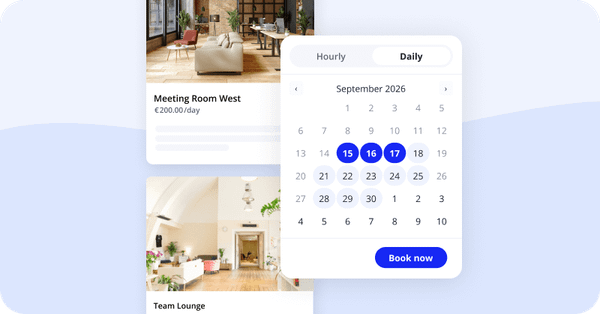
Show your rooms from every angle. Add up to 10 additional images per resource. Members browse them on the Make Booking page. With External Bookings enabled, visitors browse them on your Rooms & Resources page and can open them fullscreen on the booking page.

MEMBER PORTAL
Guides have their own place
Guides moved out from behind the Help Desk and into their own entry under Manage, where they're much easier to find. Write up how the printer works, what the door code is, how the coffee machine gets cleaned, and members stop asking. Pin the important ones to the top of the member portal so they're the first thing members see. To keep guides internal, switch on Hide guides from members under Customize » Features.

Log in with a passkey
Members with a passkey set up are asked for it as soon as they reach the login page. No email or password needed.
Set up a passkey »
AI ASSISTANTS
Cobot connector for Claude
Our MCP server is listed in Claude's connector directory. No manual setup is needed anymore. It also hands over data in a format AI assistants read more easily, so answers come back quicker and more accurately. A ChatGPT connector has been submitted and is waiting for approval.

Are you using AI tools with Cobot already, or thinking about it? Tell us how you'd want them to work together, at support@cobot.me
EXTERNAL BOOKINGS
Create any booking from the calendar
Starting a booking from the calendar, the timeline, or the New booking button asks who the booking is for: a member, a contact, or an internal admin booking. The right form opens, prefilled.
Reverse charge for EU companies
The booking form asks whether the booking is for an individual or a company. Companies based in another EU country aren't charged tax, and the invoice PDF carries the reverse charge note.
Company name and tax ID
Both are required when someone books as a company, which keeps reverse charge invoices correct.
SPACE MANAGEMENT
Search your contacts
A search field at the top of the contact list. Contacts are searchable through API v2 too.
Duplicate an admin
Set up a new admin from one who already has the right settings. Duplicate copies their permissions and notifications, so there's no recreating the same setup by hand.
More detail on pending invites
Pending admin invites show more detail and can be edited while the invite is still open. The invite link is there to copy too, in case the email gets lost.
Contact details in visitor emails
Visitor emails include your space's contact details: External Bookings, drop-in passes, events, invoices, reminders, and payment confirmations.
Map preview for your address
Editing your contact address shows the resolved coordinates on a map, so you can check that Cobot found the right spot.
Dutch is live
Dutch translations are available for all spaces in Cobot.
PAYMENTS & INVOICING
Invoices open without a login
Members can view and pay an emailed invoice without logging in. Public invoice links carry an encrypted token for extra protection.
Credits carry over
A charge with a negative amount has an option to carry the credit into future invoices. Useful when you give an NGO or a student group a set amount of free usage: a 200 EUR credit against a 150 EUR invoice applies 150 EUR and keeps the remaining 50 EUR for the next one.
Plan discounts as an invoice item
Plan discounts get their own line on the invoice, so your analytics show what discounts cost you.
E-invoicing in France
Ready and enabled for all spaces in France.
INTEGRATIONS & API
Track sign-ups and purchases
Cobot sends member sign-ups and purchases to Google Tag Manager and Meta Pixel. Contact our Support Team, and we'll switch it on for your space.
Dormakaba Exivo access control
Block door access for individual members without changing the rest of their membership.
More Zapier triggers and actions
Triggers fire when resources and allocations are created, updated, or deleted. There's also an action to create Help Desk issues.
Charges through API v2
API v2 creates charges, including for teams and with carry-over.
Member details in the calendar feed
The bookings feed puts the member's name and email in the organizer field, so calendar apps display them properly.
In Case You Missed It
- Contact details and a map – Show visitors where you are. Learn more »
- Apple Pay and Google Pay – Faster checkout on mobile. Learn more »
- External Bookings demo – See it in action. Book a demo »
Help Us Make Cobot Better For You
Want to help us make Cobot even better for spaces like yours? Join our beta tester program! You’ll get early access to upcoming features and a direct line to our product team.
Just email support@cobot.me and let us know you’d like to be a beta tester.