Hi there,
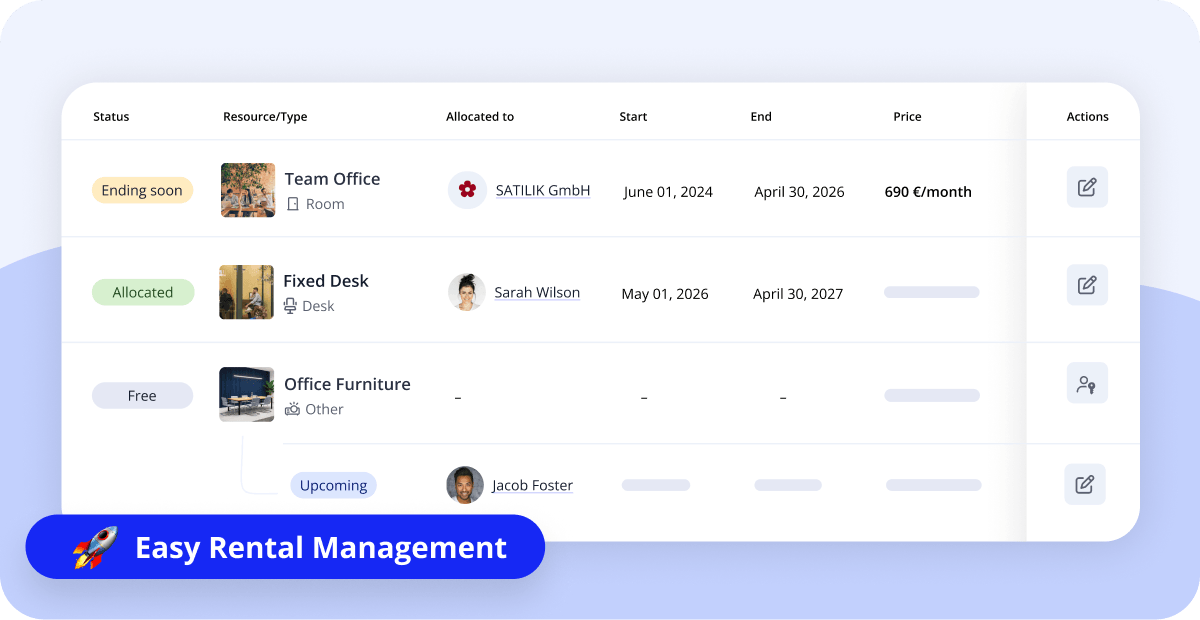
This month brings one of the biggest updates to Cobot in a while: Allocations — a new way to manage offices, fixed desks, and any resource assigned exclusively to a team or member.
SPACE MANAGEMENT
Resource Allocations
You can now allocate resources to teams or individual members for their exclusive use. The Allocation Overview (Calendar » Allocations) shows who's sitting where and until when, filterable by resource type and tag. Create allocations from there, or directly from a team or member's page. Allocated resources also show up on the member and team lists.
Allocation analytics (Analyze » Allocations) tracks occupancy and revenue per resource by month, plus totals across all allocatable resources.
Timeline, overhauled
The Timeline view (under Calendar » Timeline) has been updated to support Allocations — and it's gotten a solid upgrade in general:
- Resources are now grouped by type (Room, Desk, Other)
- New filters: tag, capacity, and usage mode (bookable vs. allocatable)
- A new 12-month view gives you a longer-range picture alongside the existing weekly view
Reminder: Resource types and usage
Last month, we added new fields to resources: type, usage mode (bookable or allocatable), and area (sqm/sqft). The resource overview also got a cleaner layout, and we introduced filtering by tags. If you haven't set your allocatable resources up yet, now's a good time.
DROP-IN PASSES
Drop-in passes and calendar blockers
We fine-tuned how calendar blockers impact drop-in passes: You can still sell drop-in passes during a calendar blocker, as long as the times don’t overlap.
For example: a morning pass can still be purchased if the blocker is only in the afternoon.
INVOICING
Payment method on invoice PDFs
Invoice PDFs now include a line showing which payment method was used — handy for members who need that detail for their accounting. To enable it for your space, reach out to support@cobot.me.
INTEGRATIONS
Zapier: new "membership created" trigger
A new trigger fires whenever a membership is created — regardless of its start date or whether it's confirmed yet. This replaces the previous version and is already active for all users.
In Case You Missed It
- Invite people to bookings – Add participants to a booking. Learn more »
- Contact invoices – All invoices, right on the Contact page. Learn more »
- Cancel drop-in passes – Helpful when a visitor can't make it. Learn more »
Help Us Make Cobot Better For You
Want to help us make Cobot even better for spaces like yours? Join our beta tester program! You’ll get early access to upcoming features and a direct line to our product team.
Just email support@cobot.me and let us know you’d like to be a beta tester.
See you next month!